I’ve been actively working to move away from proprietary software and big tech as much as possible. I use FOSS every day for all my desktop computing needs, and have done for the better part of two decades, but I never made the same effort when it came to mobile. Why is it that when I walk away from my laptop I stick a computer filled with proprietary software in my pocket without batting an eye?
As regular readers will know, I’ve been trying to move away from Apple products over the past several months. My iPhone was the one Apple product I was originally intending to keep, but the more I investigated opening up my mobile computing stack the clearer it became that moving away from it was not only a possibility but a necessity. Now, for the first time since childhood, I no longer own an Apple device.
My primary goal was to use some of the more open, community-developed tools and invest back into them. Not just the software itself, but also the back-end services that many of them rely on: OpenStreetMaps, OpenMeteo, etc. I was less interested in testing a hardened, more secure, privacy-focused os like GrapheneOS, although I did want to swap out some of the key components just to make sure all my keystrokes weren’t being shipped off to train some LLM somewhere, for example. And on the subject of AI, with more and more AI products being forced on users, I wanted the ability to completely disable all AI agents.
I also thought it would be nice if I could switch from an expensive mobile carrier to a less expensive one, and invest the savings back into the ecosystem by sponsoring projects and developers. I decided to give Mint Mobile a test drive alongside this project, cutting my monthly bill from $80 down to $30, and used the money from selling my iPhone to purchase a Pixel 9a outright.
I’m leaving out a misadventure I had with a cheap Motorola phone, which I purchased as an experiment to play around with unlocking bootloaders and flashing LineageOS. LineageOS was great, but I really resented not being able to use RCS messaging or tap-to-pay, and I experienced some gnarly stability issues where the entire phone would freeze, crash, then reboot at least once per day. Motorola doesn’t make it easy to re-flash the stock OS, and I made a few critical errors along the way that led me to doing a hard brick and leaving the phone in a completely inoperable, unbootable state. You live and you learn. I sold that phone for parts, and moved on.
That was a very useful experience because I got to learn a lot of new things about using adb and flashing custom roms, and I also was able to test drive a ton of new apps. That meant that when it came time to officially set up my new Pixel, I already had a good idea of how I wanted to set it all up.
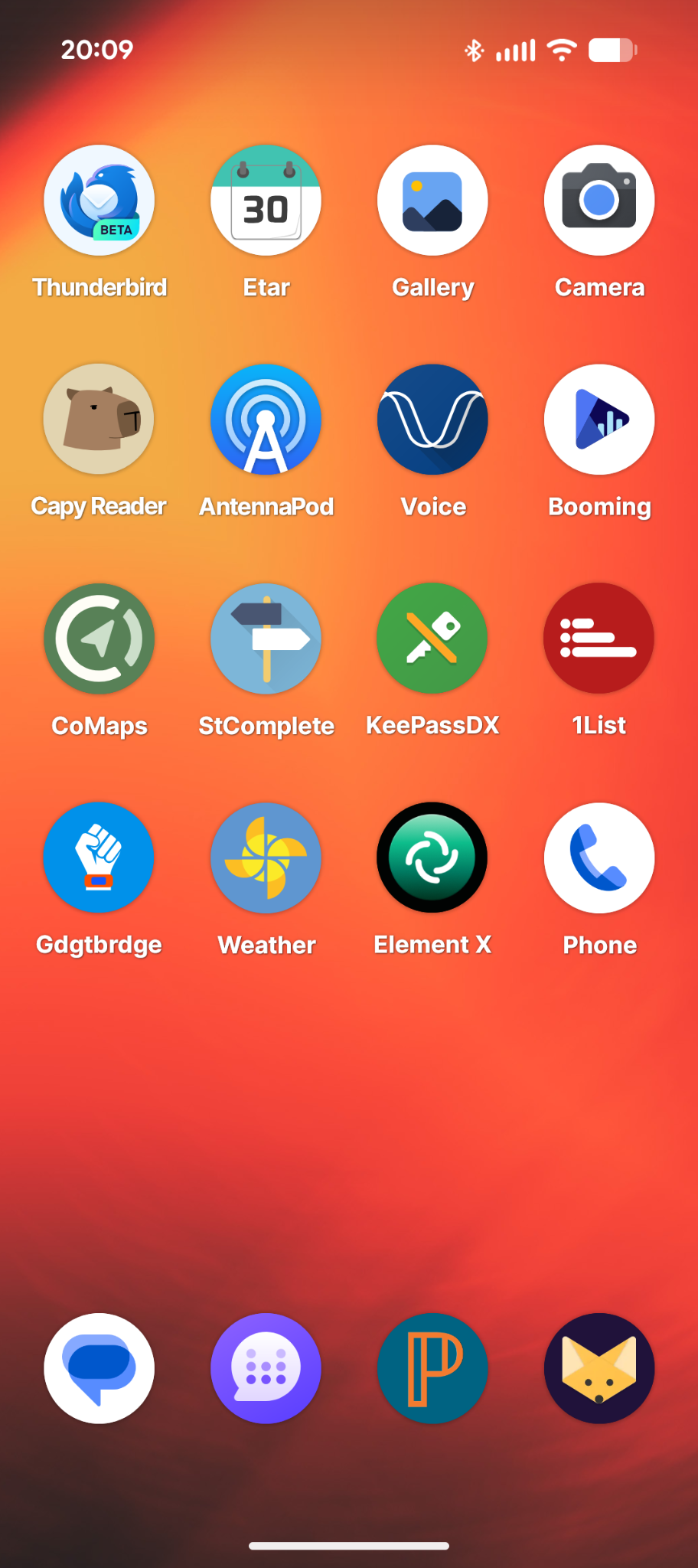
I’ve landed on this suite of apps for my daily needs:
- Thunderbird, for email
- Etar Calendar app
- Gallery (by lacoblonut01)
- Gadgetbridge, paired with my Mi Band 10
- Breeze Weather, which uses OpenMeteo and is able to act as the weather provider for Gadgetbridge
- AntennaPod, for podcasts
- Voice, for audiobooks
- Booming Music, for music (I also tried Retro Music Player, but discovered it crashed every time an album finished playing, and also noticed the project is currently in need of new maintainers)
- StreetComplete, to gamify contributions to OpenStreetMap
- KeePassDX, a password manager
- 1List, to jot down items on my grocery list
- CoMaps, for all my navigation needs
- Capy Reader, an RSS reader. I don’t really need an RSS reader on the go, so I may uninstall it if I end up never using it
- HeliBoard, an on-screen keyboard
- Lawnchair, a FOSS version of the Pixel launcher that allows for a lot more customization
I’m still on the lookout for a good epub reader, although “Book’s Story” looks like it might fit that bill pretty well once I iron out some compatibility issues.
I also installed DAVx5 so I can sync my calendar and contacts, although I’m amazed that Android-based OSes still don’t have native support for CalDAV and WebDAV built-in. This has been baked into iOS for well over a decade now.
As an aside, last year I tested using CoMaps for navigation, and mentioned that I couldn’t really use it for my needs because it doesn’t give you lane assist features. Imagine my surprise when all of a sudden, with my new phone, I was going down an exit ramp and it told me to get in the right lane. What?!? Apparently lane guidance is not available in their iOS app yet, but works beautifully in the Android app.
That has been kind of a theme these past few weeks: constant little surprise delights. Another example is with the music app. I love being able to import playlists from my computer and the music app just rolls with it. Not to mention that copying data to and from with a USB cable is quick and painless, and makes managing a local library a million times easier than on the iPhone. On the whole, the software experience has been excellent. The apps are as good as, if not better than, their iOS counterparts.
That’s not to say there aren’t papercuts or rough edges here and there. Even with these papercuts though, it seems worth it to me to use as much FOSS as possible. And while I’d love for the entire operating system to be FOSS from top to bottom, the trade-off of using the stock OS with Google Play Services so I can have tap-to-pay, RCS messaging, and incredible photos is a worthwhile trade-off for now. It shouldn’t be necessary, but as with all things, I think the secret is to find the right balance. I’m now using FOSS for about 95% of my daily computing needs, including on-the-go. There’s always room for improvement, but it’s great to celebrate the win, especially right now when users’ rights and autonomy on computers is otherwise going through a bit of a rough patch.